Drumsampler →
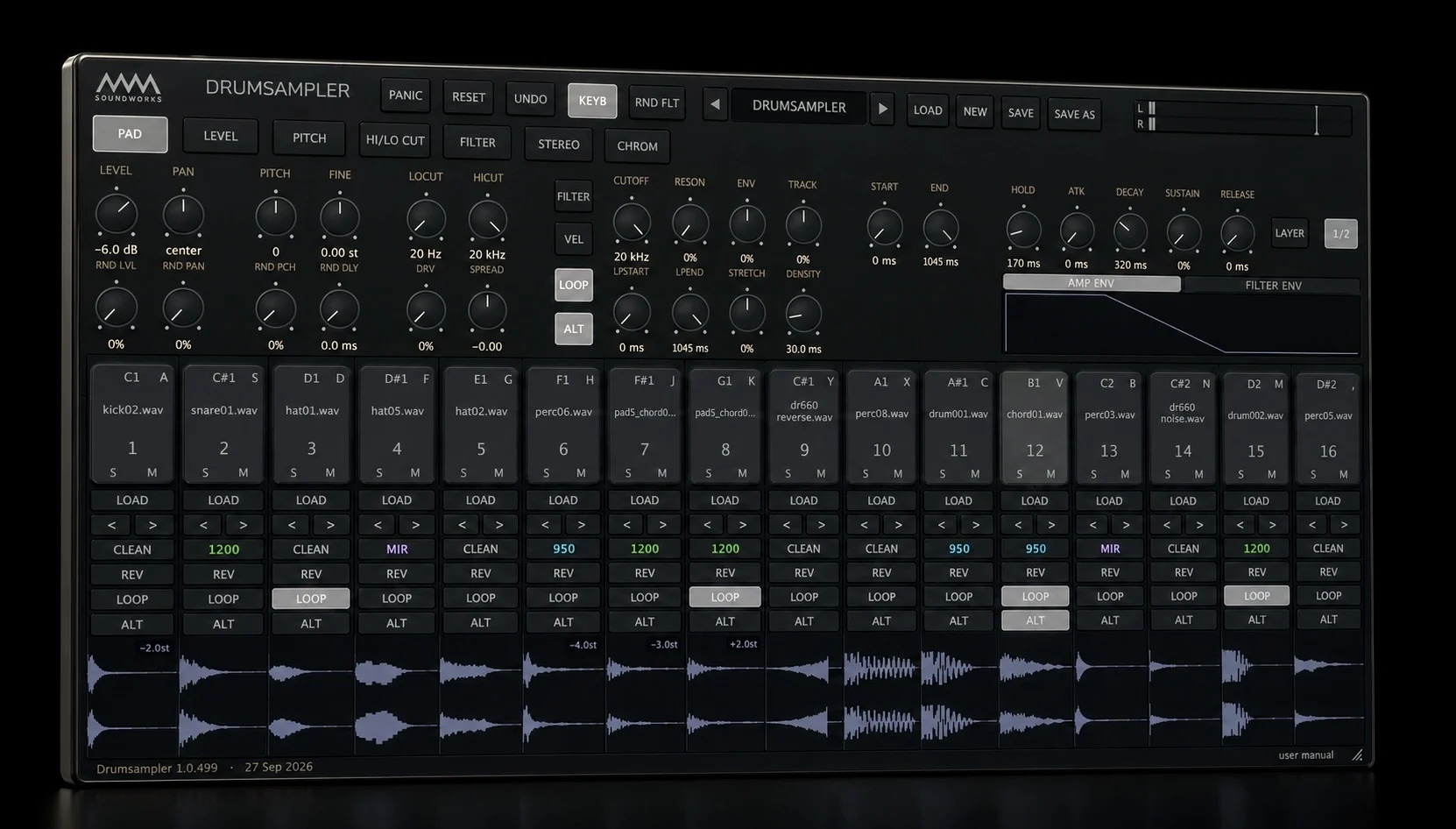
A 16-pad drum sampler plugin built for speed and character. Drop a sample on any pad, shape it with per-pad level, pitch, filters, envelopes and drive, and give each pad the pitch character of a classic vintage sampler.

MM Soundworks creates high quality audio tools for producers, sound designers, and musicians who want exceptional sound - easy to use without slowing down.
A 16-pad drum sampler plugin built for speed and character. Drop a sample on any pad, shape it with per-pad level, pitch, filters, envelopes and drive, and give each pad the pitch character of a classic vintage sampler.

A free, component-modeled recreation of the classic SSM2044 filter chip. The four-pole lowpass heard in the SP-1200 and many classic synths - from silky sweeps to gritty drum crunch to screaming self-oscillation.
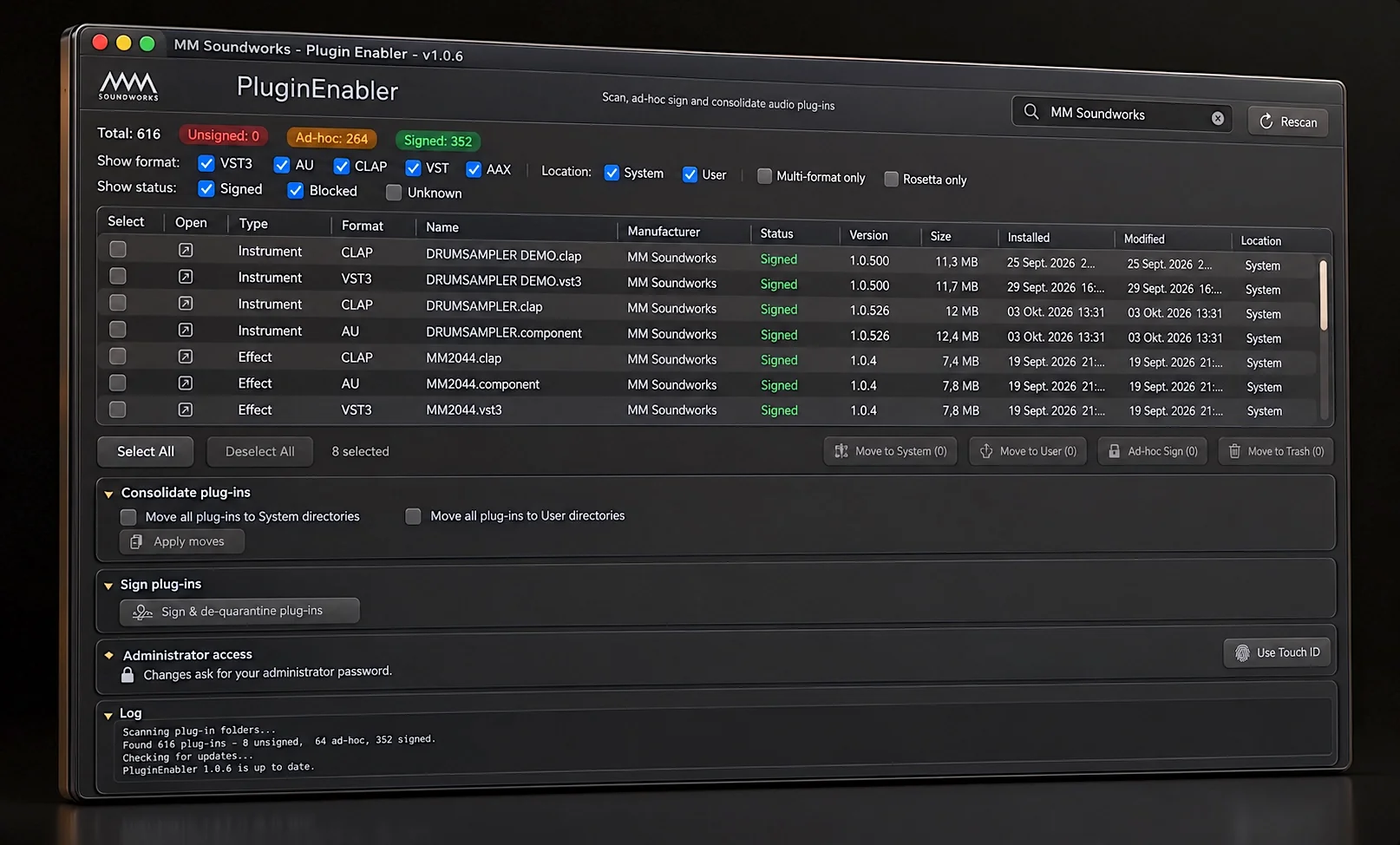
A free macOS plugin manager. Finds plugins that won't load and fixes them in one click, tests any instrument or effect without opening a DAW, and tidies up your plugin folders.
A 16-pad drum sampler plugin built for speed and character. Drop a sample on any pad, shape it with per-pad level, pitch, filters, envelopes and drive, and give each pad the pitch character of a classic vintage sampler.
macOS: VST3, AudioUnit, CLAP · Windows: VST3, CLAP
E-mu, Ensoniq and Akai are trademarks of their respective owners, who reserve all rights. The names are used only to describe the sound character: Drumsampler emulates the pitch engines of these samplers, not the complete instruments, and is not affiliated with or endorsed by the rights holders.
€49
one-time · no subscription
Free demo for Mac and Windows - try it in your DAW before you buy
For registered users only
A free, component-modeled recreation of the legendary SSM2044 filter chip. The circuit is modeled stage by stage from the original schematics — not a generic ladder approximation — capturing the exact four-pole lowpass that shaped the Korg Polysix and Mono/Poly, the E-mu SP-12 and SP-1200, and the PPG Wave. From silky-smooth sweeps to gritty drum crunch to screaming self-oscillation.
All product and company names are trademarks of their respective owners and are used solely to identify the sound character being emulated. MM Soundworks is not affiliated with Korg, E-mu Systems, or PPG.
Free
free download · no cost
A free macOS utility that scans your plugin folders, finds plugins that won't load and fixes them with one click. Open and test any instrument or effect without starting your DAW, and keep your plugin folders clean and organised.
Free
macOS utility · no cost
Help & Documentation
Download the installer from your purchase confirmation email, or use Download Latest Version on the product page — enter the name and email you bought with and we'll send fresh links for everything you own. Run the installer and your plugin will be available in your DAW's plugin manager. Scan for new plugins if it doesn't appear automatically.
macOS: macOS 13 (Ventura) or later — Apple Silicon and Intel. VST3, AudioUnit or CLAP compatible DAW (Logic Pro, Ableton Live, Bitwig Studio, Reaper, and others).
Windows (Drumsampler and MM2044): Windows 10 or later, 64-bit. VST3 or CLAP compatible DAW (Ableton Live, Bitwig Studio, Reaper, Cubase, FL Studio, and others).
If the plugin doesn't appear in your DAW, try rescanning your plugin folders. Make sure your DAW supports VST3, AudioUnit or CLAP. For Logic Pro, use the AU version. For issues not resolved here, use the contact form.
Please use the contact form and select the appropriate request type. Include your DAW name and version, macOS version, and plugin version.
Frequently Asked Questions
Your license covers up to two (2) personal computers that you own or control — for example your studio Mac and your laptop. See the EULA for full terms.
Yes. Your license covers both commercial and non-commercial use of audio produced with our plugins — music, film, games, client work, anything you create is yours.
Yes — every paid plugin has a free demo build, so you can test it in your own DAW on your own material before buying. You'll find the Download Demo button next to the price on each product page; we email you a personal download link.
Our plugins are available as VST3, AudioUnit and CLAP for macOS 13 or later, on Apple Silicon and Intel. Drumsampler and MM2044 are also available for Windows 10 or later (64-bit) as VST3 and CLAP. They work in Logic Pro (use the AU version), Ableton Live, Bitwig Studio, Reaper, Cubase, FL Studio, and any other DAW that supports these formats.
Checkout is handled by the payment provider Lemon Squeezy. After purchase you'll receive a confirmation email with your download link and license details. If it doesn't arrive within 30 minutes, check your spam folder or contact us.
Click Download Latest Version next to the price on any product page and enter the name and email address you used when you bought. We'll email you fresh download links for the current version, for every plugin registered to you, along with your license keys. Updates are free for your product version (eg. 1.x.x) - there is no separate account to create.
As a rule, all sales of digital products are final — please use the free trial and review the product details and system requirements before purchasing. See our refund policy for details.
Get in touch
We typically respond within 1–2 business days. For bug reports or feature requests, please include your DAW, OS version, and plugin version.
Release news, demos and work in progress go out on Instagram: @mm_soundworks.
Redeem a code
Have a voucher code? Enter your details and we’ll take you to the checkout with the code applied.
Your name is registered to the licence and is shown inside the plugin, so please enter it as you would like it to appear.
These details are passed straight to our payment provider, Lemon Squeezy, to create your licence. Nothing is stored on this page. See the Privacy Policy.
Legal
Last updated: October 2026
We collect information you provide directly, such as your name, email address, and billing details when making a purchase or contacting us. We also collect certain data automatically when you visit our website, including your IP address, browser type, referring URLs, and pages viewed. This technical data is used solely for security and to improve site performance. When you request a free plugin or a demo build we record additional details about that request — see section 5 below. We do not purchase or obtain personal information from third-party data brokers.
We use the information we collect to process and fulfil your orders, deliver license keys, respond to support and contact requests, prevent fraud, and maintain the security of our services. We may also use your email address to send you important product updates or announcements. If you subscribe to our newsletter, we use your email address solely to send you product news and updates; every email we send carries a one-click unsubscribe link, and you can also unsubscribe by contacting us. We do not sell your personal data to third parties, and we do not use it for behavioural advertising.
We do not sell or rent your personal information. We may share data with trusted service providers who assist in operating our website and processing payments — these providers are contractually bound to handle your data securely and only for the purposes we specify. Specifically, payments are processed by Lemon Squeezy, LLC as Merchant of Record, and messages sent through our contact form are transmitted and delivered to us via Formspree, Inc. (a US-based service; your name, email address, and message content are processed under Formspree's privacy policy) When you request a plugin, demo or update download, the IP address of that request is sent to ip-api.com solely to resolve it to an approximate location, as described in section 5; download requests themselves are stored only on our own server and are not passed to Formspree or any other third party. We may also disclose information when required by law or to protect the rights and safety of MM Soundworks or others. In the event of a business transfer, personal data may be transferred as part of that transaction.
This website does not use cookies. We also do not use any tracking technologies — no analytics, no advertising trackers, no fingerprinting. If this ever changes, this policy will be updated accordingly.
In short: we record your name, email address, the requested download and the time, plus your IP address, browser, operating system, language and referring page, to deliver the file and prevent abuse. If you have bought a plugin, we also keep a licence record so you can fetch updates. In detail:
Free plugins and demo builds are delivered by email: you enter your name and email address, we send you a personal download link that is valid for 24 hours. To provide that service, prevent abuse of it, and keep a record of who accepted the licence terms, we record each request in a database on our own server. The record contains the name and email address you entered, which product was requested, the date and time, whether you ticked the newsletter box, your IP address, the browser, browser version, operating system, language and time zone reported by your browser, the page on our site you made the request from, and — if your browser sends it — the address of the website you followed a link from to reach us. We also derive an approximate location (country, and where available region and city) from that IP address; this is looked up on our behalf by ip-api.com, a geolocation service that receives the IP address for that single lookup and to which we send no other data. No GPS or device location is used and you are never asked for location access. We also record when an emailed link is actually used to fetch a file.
Requests for the latest version of a plugin you have bought are recorded in exactly the same way, with one difference: the address you enter is compared against our licence records, and the disposable-address check does not apply, because the address you bought with is the one your licence is held under. We answer every such request identically whether or not a licence was found, so that the form cannot be used to find out whether a given address belongs to a customer. If nothing matches, no email is sent.
The newsletter works the same way and is stored in the same database on our own server — it is not passed to Formspree or any other third party. Signing up is double opt-in: entering your address records it as unconfirmed, and you are only subscribed once you open a confirmation link we email to it. If you never do, the unconfirmed entry is all that exists and you hear nothing further from us. Where you sign up on a preview page, that link arrives in a confirmation email of its own. Where you sign up by ticking the newsletter box while requesting a download, it arrives in your download email instead, and the single button in that email both confirms the subscription and starts the download — the button says so, and the email tells you before you click. If you would rather have the download without the subscription, simply leave the newsletter box unticked when you request it. We store the address, which product page you signed up from, the date and time, and the same technical details listed above for both the signup and the confirmation click — that pair is how we can demonstrate, if we are ever asked to, that the consent was given by the holder of the address. The legal basis is Art. 6(1)(a) GDPR (consent), and § 7 UWG. The subscription covers product releases, new plugins and free tools. Every email carries a one-click unsubscribe link that needs no login and never expires; using it withdraws your consent for that address immediately and for all of its signups at once.
Separately from the request log, we keep a licence record for each plugin you buy. It contains your name and email address, which product the licence covers, the licence key, our reference for the order and the purchase date. We use it to deliver your licence key, to let you re-request download links for the products you own, and to answer support questions. The legal basis is Art. 6(1)(b) GDPR (performing the purchase contract) and, for the retention period, Art. 6(1)(c) GDPR (statutory accounting and tax obligations). Licence records are kept for the life of the licence and for as long as accounting law requires afterwards. They are stored on our own server and are not shared for advertising or passed to any third party.
The legal basis for the download records is Art. 6(1)(b) GDPR (delivering the download you asked for) and Art. 6(1)(f) GDPR — our legitimate interest in preventing abuse of the download service and in being able to show that the licence terms were accepted. Ticking the newsletter box is entirely optional and is never required in order to request a download: leaving it unticked gets you the download and nothing else. Where you do tick it, the confirmation is combined with your download link so that one click does both, that consent is Art. 6(1)(a) GDPR, and you can withdraw it at any time through the one-click unsubscribe link carried by that same email and every email we send afterwards. Temporary and disposable email addresses are rejected, as are the forwarding/alias addresses handed out by relay services, because an inbox that can be switched off at any time cannot be relied on to receive the link.
Download records are kept for as long as needed for the purposes above and are deleted or anonymised afterwards. This data is not sold, not shared for advertising, and not used to track you across other websites.
All payments are handled by Lemon Squeezy, LLC, which acts as the Merchant of Record. Lemon Squeezy processes your payment information under their own privacy policy. MM Soundworks does not receive or store your payment card details.
We retain personal data only for as long as necessary to fulfil the purposes described in this policy, or as required by applicable law. Purchase records and associated contact information are kept for the period required under applicable accounting and tax regulations. Data that is no longer needed is deleted or anonymised.
We implement appropriate technical and organisational measures to protect your personal data against unauthorised access, loss, or misuse. However, no method of transmission over the internet is completely secure, and we cannot guarantee absolute protection.
Our website and products are not directed at children under the age of 16. We do not knowingly collect personal data from minors. If we become aware that a minor has provided us with personal information, we will take steps to delete it promptly.
Depending on your location, you may have the right to access, correct, delete, or restrict the processing of your personal data, as well as the right to data portability and the right to object to certain types of processing. To exercise any of these rights, please contact us via the contact form. We will respond within 30 days.
There is currently no universally accepted standard for responding to Do-Not-Track (DNT) browser signals. We do not currently respond to DNT signals, but we do not engage in cross-site behavioural tracking.
We may update this privacy policy from time to time. The updated version will be indicated by a revised date at the top of the page. Continued use of the website following any changes constitutes your acceptance of those changes.
If you have questions or concerns about this policy or our data practices, please reach out via our contact form.
Legal
Last updated: April 2026
Please read this End User License Agreement ("Agreement") carefully before installing or using any software product from MM Soundworks ("the Software"). By installing or using the Software, you agree to be bound by the terms of this Agreement.
MM Soundworks grants you a non-exclusive, non-transferable license to install and use the Software on up to two (2) personal computers that you own or control. This license covers both commercial and non-commercial use of audio output produced with the Software — meaning you may use sounds and recordings made with our products in your own music, productions, and finished works. You may not resell, sublicense, rent, lease, or otherwise transfer the Software or any derivative library based on it to any third party without prior written consent from MM Soundworks.
MM Soundworks retains all copyright, trade secret, and other intellectual property rights in and to the Software, including all sample content, presets, code, and documentation. This Agreement does not transfer any ownership rights to you. You agree to take all reasonable steps to protect the Software from unauthorised copying or distribution. MM Soundworks reserves the right to embed digital watermarks or other identification mechanisms in its products to trace and act upon unauthorised distribution.
All sales are final. MM Soundworks does not offer refunds on digital products. Please review all product details, system requirements, and compatibility information before purchasing. If you have any questions prior to purchase, reach out via the contact form. Nothing in this section limits any statutory rights you may have under the laws of your country of residence, including statutory warranty rights for defective products.
The Software is provided "as is" without warranty of any kind, express or implied, including but not limited to warranties of merchantability, fitness for a particular purpose, or non-infringement. MM Soundworks does not warrant that the Software will be error-free or operate without interruption. Your use of the Software is entirely at your own risk.
To the maximum extent permitted by applicable law, MM Soundworks shall not be liable for any indirect, incidental, special, consequential, or punitive damages, including but not limited to loss of profits, loss of data, or business interruption, arising out of or in connection with your use of the Software, even if MM Soundworks has been advised of the possibility of such damages.
This Agreement is effective from the date you install the Software and continues until terminated. If you breach any term of this Agreement, your license will terminate immediately without notice. Upon termination, you must uninstall the Software and destroy all copies in your possession. Sections 2, 3, 4, 5, and 8 survive termination of this Agreement.
Licenses purchased at educational or not-for-resale (NFR) pricing are restricted to the intended use stated at the time of purchase. Educational licenses are for use by enrolled students, faculty, or staff within an educational institution and may not be used for commercial purposes outside that context.
This Agreement constitutes the entire agreement between you and MM Soundworks regarding the Software and supersedes all prior understandings. If any provision of this Agreement is found to be unenforceable, the remaining provisions remain in full force. This Agreement is governed by applicable law, and any disputes shall be resolved in the courts of the jurisdiction in which MM Soundworks is registered.
Legal
Last updated: April 2026
By accessing or using the MM Soundworks website at mmsoundworks.com ("the Site"), you agree to be bound by these Terms of Service. If you do not agree to these terms, please do not use the Site.
You must be of legal age in your jurisdiction to make purchases on this Site. You agree to use the Site only for lawful purposes and in a manner that does not infringe the rights of others. Any breach of these terms may result in immediate termination of your access to the Site and our services.
MM Soundworks reserves the right to refuse service to anyone at any time for any reason. You may not reproduce, duplicate, copy, sell, or resell any portion of the Site or its content without our express written permission. We are not responsible for any information transmitted via the Site that is not encrypted.
We make reasonable efforts to ensure the accuracy of product descriptions, pricing, and other content on this Site. However, we do not warrant that information is complete, current, or error-free. Any material on the Site is provided for general reference and should not be solely relied upon for purchasing decisions.
Prices and product availability are subject to change without notice. MM Soundworks reserves the right to modify or discontinue any product or service at any time without liability to you. We are not responsible for any loss resulting from a change in price or discontinuation of a product.
We reserve the right to refuse or cancel any order. You agree to provide accurate, current, and complete billing and account information at the time of purchase. If your payment information changes, it is your responsibility to update it to ensure successful transactions.
The Site may include links to third-party websites or integrate third-party services. These are provided for convenience only. MM Soundworks has no control over and accepts no responsibility for the content, privacy practices, or reliability of third-party sites. Access to third-party services is at your own risk.
Any content you submit to MM Soundworks — such as feedback, suggestions, or support requests — may be used by us to improve our products and services. You grant MM Soundworks a royalty-free, perpetual licence to use such submissions for these purposes. We reserve the right to remove or refuse any submitted content we deem inappropriate or unlawful.
You agree not to engage in any of the following: unauthorised access to our systems, transmitting malicious code or content, impersonating others, scraping or harvesting data from the Site, or using the Site to facilitate unlawful activity. Violations may result in immediate termination of access and legal action.
The Site and all products and services are provided "as is" and "as available" without any warranties of any kind, either express or implied. MM Soundworks does not warrant that the Site will be uninterrupted, error-free, or free of harmful components.
To the fullest extent permitted by law, MM Soundworks shall not be liable for any direct, indirect, incidental, or consequential damages arising from your use of the Site or our products, including but not limited to loss of data or loss of profits.
You agree to indemnify and hold harmless MM Soundworks and its affiliates from any claims, losses, or damages — including reasonable legal fees — arising out of your breach of these Terms or your violation of any applicable law.
If any provision of these Terms is found to be unlawful or unenforceable, that provision will be severed from the rest. All remaining provisions will continue in full force and effect.
We reserve the right to terminate or suspend your access to the Site and our services at any time, without notice, if we believe you have violated these Terms or applicable law.
These Terms of Service, together with our Privacy Policy and any applicable product license agreements, constitute the entire agreement between you and MM Soundworks regarding your use of the Site and supersede all prior communications or agreements.
We may update these Terms of Service at any time. Changes will be posted to this page with an updated date. Continued use of the Site after changes are posted constitutes your acceptance of the revised Terms.
If you have any questions about these Terms, please contact us via our contact form.
Legal
Last updated: July 2026
As a rule, all sales of digital products are final and MM Soundworks does not offer refunds. Please use the free trial builds and review all product details, system requirements, and compatibility information carefully before purchasing. If you have questions about compatibility or features before you buy, reach out via the contact form — we're happy to help.
All purchases are processed by Lemon Squeezy, LLC, acting as the Merchant of Record. Refund requests are therefore handled in accordance with Lemon Squeezy's Terms of Service in addition to this policy. If you believe you have a valid claim — for example, a duplicate purchase or a technical fault we cannot resolve — please contact us first so we can look into it.
Nothing in this policy limits any statutory rights you may have under the laws of your country of residence, including statutory warranty rights for defective products.
Legal
MM Soundworks
Matthias Meyer
c/o MDC#mmsoundworks
Welserstraße 3
87463 Dietmannsried
Email:
Contact Form
The European Commission provides a platform for online dispute resolution (ODR): ec.europa.eu/consumers/odr. We are not obligated to participate in dispute resolution proceedings before a consumer arbitration board.
